

Marketing automation tools for small business help automate repetitive marketing tasks such as email campaigns, lead nurturing, customer follow-ups, social media scheduling, segmentation, and performance tracking. The right tool can save time, improve customer engagement, reduce manual work, and help a small business build a scalable marketing system without requiring a large marketing team.
Running marketing for a small business can quickly become overwhelming. Business owners and small marketing teams often have to manage email campaigns, social media, lead generation, customer follow-ups, website visitors, and sales communication at the same time. Doing everything manually can consume valuable time and make it difficult to maintain consistent customer communication.
This is where marketing automation tools for small business become valuable.
Marketing automation allows businesses to create workflows that automatically respond to customer actions. For example, when someone subscribes to an email list, downloads a resource, fills out a contact form, or abandons a shopping cart, an automated workflow can trigger the appropriate message or follow-up.
The goal is not to remove the human element from marketing. Instead, automation helps small businesses handle repetitive tasks more efficiently while allowing marketers to focus on strategy, creativity, and customer relationships.
If you want a broader understanding of the subject, you can also explore this guide on Marketing Automation for Small Business.
What Is Marketing Automation?
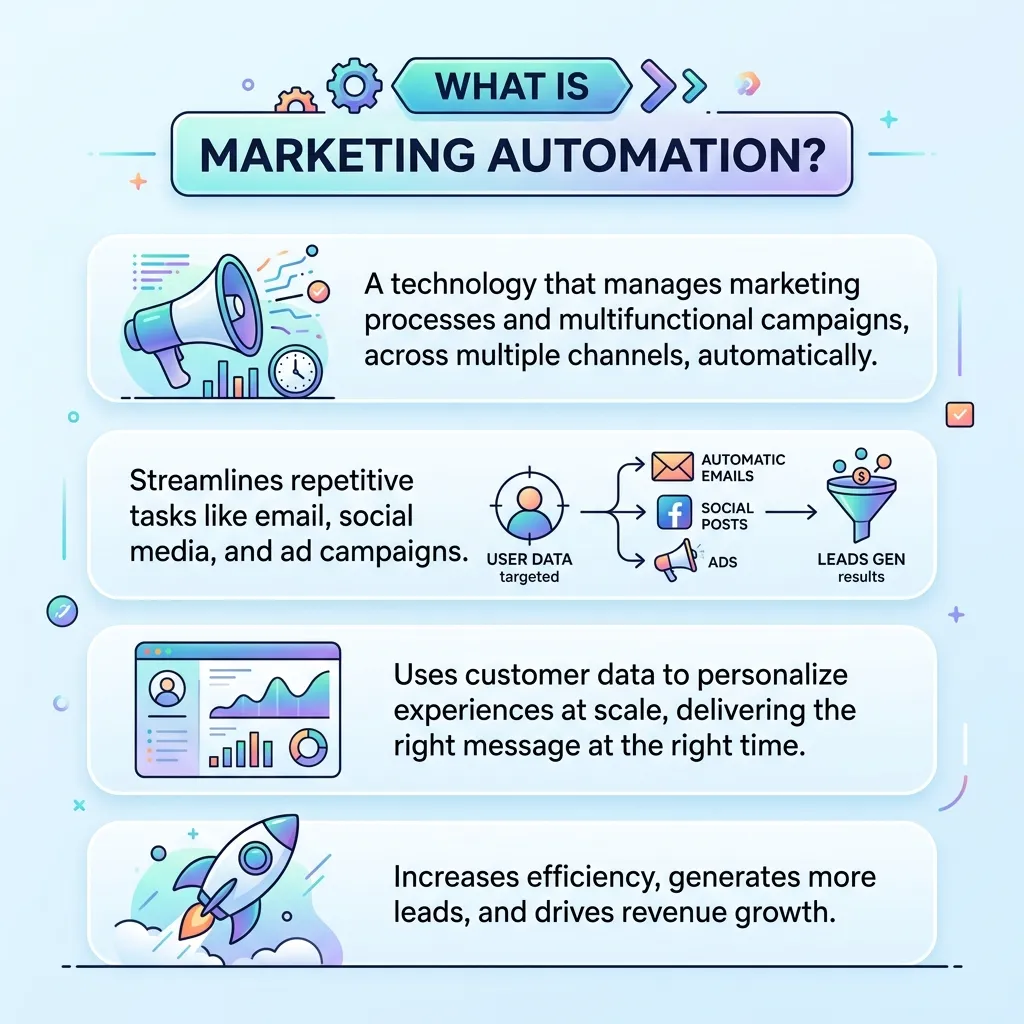
Marketing automation is the use of software to automate repetitive marketing activities based on predefined rules, customer information, or user behavior.
Instead of manually sending every email or following up with every lead, businesses can create automated workflows that perform these actions at the right time.
Common marketing automation activities include:
- Email marketing
- Lead nurturing
- Customer segmentation
- Welcome campaigns
- Follow-up emails
- Abandoned-cart reminders
- Social media scheduling
- Customer onboarding
- Personalized content delivery
- Campaign reporting
- Lead scoring
- Customer retention campaigns
For example, a small online store could create a workflow where a new subscriber receives a welcome email immediately, a product recommendation two days later, and a promotional message a few days after that.
Why Small Businesses Need Marketing Automation Tools
Small businesses usually operate with limited budgets, employees, and resources. Marketing automation can help them accomplish more without continuously increasing their workload.
1. Saves Time
Manual marketing tasks can take hours every week. Automation handles repetitive activities such as sending emails, updating customer records, and scheduling follow-ups.
This gives small business owners more time to focus on sales, customer service, product development, and business growth.
2. Improves Customer Engagement
Customers expect businesses to communicate quickly and relevantly. Automated workflows can deliver messages based on customer actions instead of sending the same communication to everyone.
For example, a customer who downloads a guide can automatically receive related educational content.
3. Supports Lead Nurturing
Not every prospect is ready to purchase immediately. Marketing automation tools allow businesses to build nurturing sequences that keep prospects engaged until they become sales-ready.
4. Reduces Human Error
Manual marketing involves repetitive data entry and campaign management. Mistakes can happen when marketers forget a follow-up, send the wrong message, or overlook a customer.
Automation can make these processes more consistent.
5. Makes Marketing More Scalable
A small team may be able to manually manage 50 customers, but managing thousands of contacts manually is difficult.
Automation allows businesses to maintain structured communication as their customer base grows.
Key Features of Marketing Automation Tools for Small Business
Not every automation platform offers the same capabilities. Before choosing a tool, small businesses should understand which features actually matter.
Email Automation
Email automation is one of the most important features. Businesses can create automated sequences for:
- New subscribers
- Product promotions
- Lead nurturing
- Customer onboarding
- Re-engagement
- Abandoned carts
- Event reminders
Customer Segmentation
Segmentation divides an audience into smaller groups based on characteristics or behavior.
Examples include:
- New customers
- Returning customers
- High-value customers
- Website visitors
- Email subscribers
- Inactive customers
- Leads from specific campaigns
Better segmentation allows businesses to deliver more relevant messages.
CRM Integration
Integration with a CRM allows marketing and sales information to work together.
A marketing automation platform can record customer interactions and help sales teams understand where prospects are in the buying journey.
Lead Scoring
Lead scoring assigns values to prospects based on actions such as:
- Opening emails
- Clicking links
- Visiting important pages
- Downloading content
- Requesting information
- Making purchases
This can help businesses prioritize leads that show stronger buying intent.
Workflow Builder
A visual workflow builder makes it easier to create automated customer journeys.
A simple workflow might look like:
Website signup → Welcome email → Educational email → Product recommendation → Sales follow-up
Analytics and Reporting
Automation is most useful when businesses can measure results.
Look for tools that provide metrics such as:
- Email open rate
- Click-through rate
- Conversion rate
- Lead generation
- Customer acquisition
- Revenue
- Unsubscribe rate
- Campaign performance
For a broader data-driven perspective, your Marketocom resource on data-driven communications strategy can provide additional context on using analytics, automation, and customer data together.
Types of Marketing Automation Tools for Small Business
Different businesses need different types of automation.
Email Marketing Automation Tools
These platforms focus primarily on automated email campaigns and subscriber management.
They are useful for:
- Newsletters
- Welcome sequences
- Promotional campaigns
- Lead nurturing
- Customer re-engagement
CRM and Marketing Automation Platforms
These tools combine customer relationship management with marketing automation.
They can help businesses manage contacts, leads, sales pipelines, campaigns, and customer interactions from a centralized system.
Social Media Automation Tools
Social media automation platforms help businesses schedule posts, organize content calendars, monitor engagement, and manage multiple social accounts.
E-commerce Automation Tools
E-commerce businesses can automate:
- Abandoned-cart emails
- Product recommendations
- Order follow-ups
- Customer retention campaigns
- Promotional sequences
All-in-One Marketing Platforms
All-in-one platforms combine multiple capabilities such as email marketing, CRM, landing pages, analytics, automation workflows, and lead management.
These can be useful for businesses that want fewer disconnected tools.
Best Marketing Automation Tools for Small Business
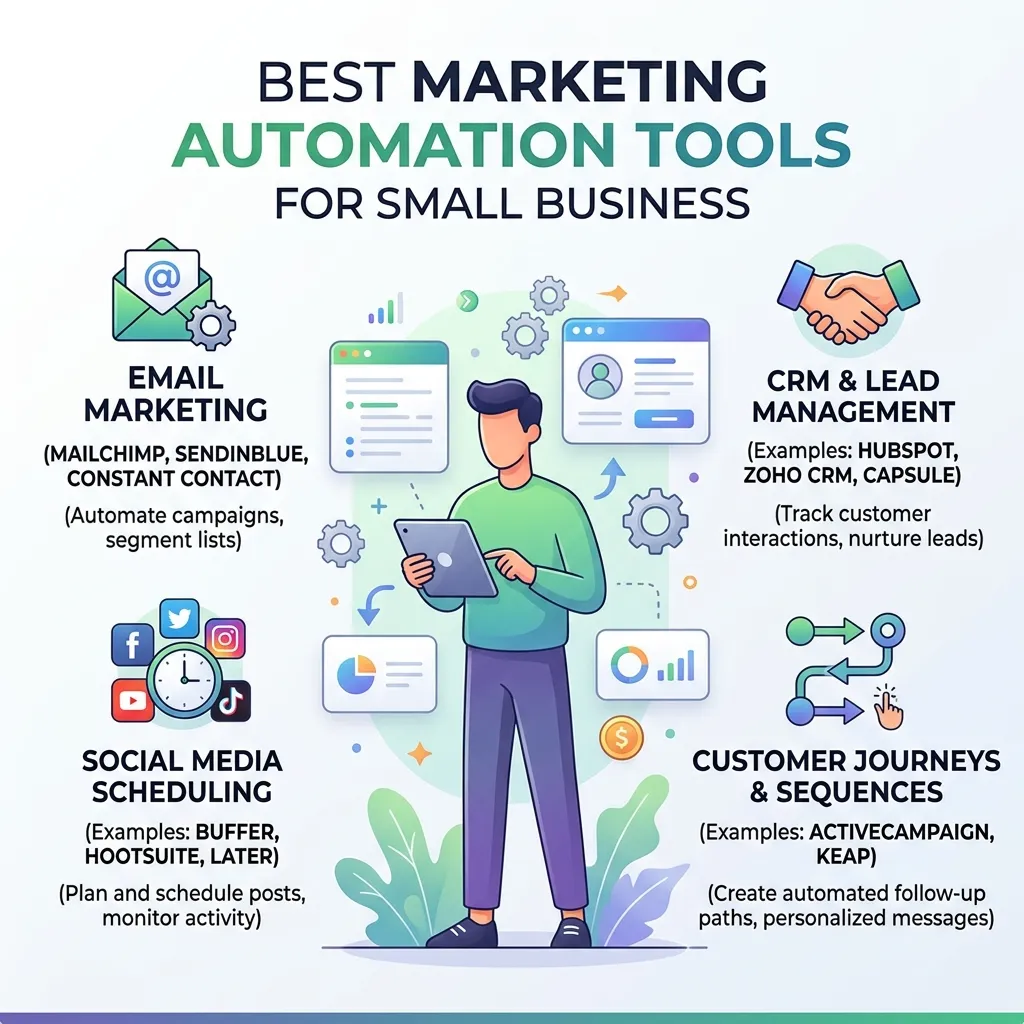
The best platform depends on business size, marketing channels, budget, technical skills, and objectives.
1. HubSpot
HubSpot is a popular option for businesses that want CRM, marketing, sales, and automation capabilities within one ecosystem.
It can be useful for businesses that expect their marketing operations to become more sophisticated over time.
2. Mailchimp
Mailchimp is widely known for email marketing and automation. It can be a practical starting point for small businesses that primarily need email campaigns and basic customer engagement workflows.
3. ActiveCampaign
ActiveCampaign focuses heavily on automation, email marketing, customer journeys, and CRM functionality.
It can be particularly useful for businesses that want more advanced automated workflows.
4. Brevo
Brevo offers email marketing, automation, customer communication, and other marketing features. It can be considered by small businesses looking for a broader communication platform.
5. Zoho Marketing Automation
Zoho provides marketing automation features that can integrate with other business tools within the Zoho ecosystem.
This may be useful for businesses already using Zoho products for CRM or business management.
6. Klaviyo
Klaviyo is especially popular among e-commerce businesses because of its emphasis on customer data, segmentation, personalization, and automated communication.
How to Choose the Right Marketing Automation Tool
Choosing the cheapest tool is not always the best strategy. The right platform should match your business needs.
Step 1: Define Your Marketing Goals
First determine what you want automation to accomplish.
Your goals might include:
- Generating more leads
- Increasing online sales
- Improving email engagement
- Reducing manual work
- Improving customer retention
- Increasing repeat purchases
Step 2: Identify Your Most Repetitive Tasks
Make a list of tasks your team performs repeatedly.
For example:
- Sending welcome emails
- Following up with leads
- Scheduling social posts
- Updating customer information
- Sending reminders
- Reporting campaign performance
These tasks are good candidates for automation.
Step 3: Determine Your Budget
Small businesses should consider both the subscription cost and the operational value of the platform.
A slightly more expensive tool may be worthwhile if it saves significant time and improves conversions.
Step 4: Check Integrations
Your automation tool should ideally connect with the platforms you already use.
Check compatibility with:
- Website platforms
- CRM software
- E-commerce platforms
- Email systems
- Social media
- Analytics tools
- Payment systems
Step 5: Evaluate Ease of Use
A platform with hundreds of features is not useful if your team cannot use them effectively.
Look for:
- Simple dashboards
- Drag-and-drop workflows
- Easy reporting
- Clear documentation
- Templates
- Reliable customer support
How to Set Up Marketing Automation for a Small Business
You do not need to automate everything immediately.
Start with one or two high-value workflows.
Create a Welcome Workflow
A welcome workflow can automatically introduce new subscribers to your business.
A simple sequence could be:
Day 0: Welcome email
Day 2: Helpful educational content
Day 5: Product or service introduction
Day 8: Customer benefit or case study
Day 12: Call to action
Automate Lead Follow-Up
When someone fills out a form, the automation system can send an immediate confirmation and begin a nurturing sequence.
This reduces the chance of losing interested prospects because of delayed communication.
Automate Customer Onboarding
After a purchase, customers can automatically receive:
- Thank-you messages
- Product instructions
- Setup information
- Helpful resources
- Support information
- Review requests
This can improve the overall customer experience.
Marketing Automation vs. Manual Marketing
| Factor | Manual Marketing | Automated Marketing |
|---|---|---|
| Repetitive tasks | Time-consuming | Automated |
| Follow-ups | Easy to miss | Triggered automatically |
| Personalization | Often limited | Highly scalable |
| Reporting | Requires manual work | Automated dashboards |
| Scalability | Limited | Higher |
| Initial setup | Simple | Requires planning |
| Long-term efficiency | Lower | Higher |
Automation does not mean that businesses should stop communicating personally. Human interaction remains important for complex sales, customer support, and relationship building.
Common Marketing Automation Mistakes
Automating Too Much
Not every customer interaction should be automated.
Over-automation can make a brand feel robotic and impersonal.
Sending Too Many Messages
Automation makes it easy to send frequent messages, but excessive communication can cause unsubscribes and customer frustration.
Ignoring Data Quality
Incorrect customer information can result in irrelevant messages.
Businesses should regularly clean and organize their contact data.
Using the Same Message for Everyone
A single message rarely works equally well for every customer.
Use segmentation to make communication more relevant.
Forgetting Human Follow-Up
Automation should support sales and customer service teams, not completely replace them.
High-value leads may still require personal conversations.
How to Measure Marketing Automation Success
The effectiveness of marketing automation should be measured against business goals.
Important metrics include:
Conversion Rate
Measures how many prospects complete a desired action.
Customer Acquisition Cost
Shows how much it costs to acquire a new customer.
Email Click-Through Rate
Measures how many recipients click links within an email.
Lead-to-Customer Rate
Shows how effectively marketing-generated leads become customers.
Customer Lifetime Value
Estimates the total value generated by a customer over their relationship with the business.
Return on Investment
Compare the revenue generated by automation campaigns with the cost of the tools and campaigns.
How Small Businesses Can Get More From Marketing Automation
Start small and improve gradually.
A practical approach is:
- Choose one automation platform.
- Connect the essential business systems.
- Clean your customer database.
- Create one welcome workflow.
- Build one lead-nurturing workflow.
- Set up tracking.
- Monitor results.
- Test different messages.
- Improve underperforming workflows.
- Add new automation only when the existing system works well.
Small businesses can also combine automation with broader marketing strategies. For example, trend-based campaigns can be connected to automated email or social workflows when customer behavior indicates strong interest.
For businesses exploring broader automation strategy, the complete marketing automation strategy guide can serve as a related resource.
Marketing Automation Tools for Small Business: Best Practices
To get better results, follow these principles:
- Keep workflows simple at first.
- Define a clear objective for every automation.
- Segment customers appropriately.
- Personalize messages when useful.
- Avoid excessive communication.
- Review automation regularly.
- Track conversions instead of vanity metrics.
- Maintain clean customer data.
- Test subject lines and calls to action.
- Keep human support available.
- Document important workflows.
- Remove automations that no longer provide value.
Future of Marketing Automation for Small Businesses
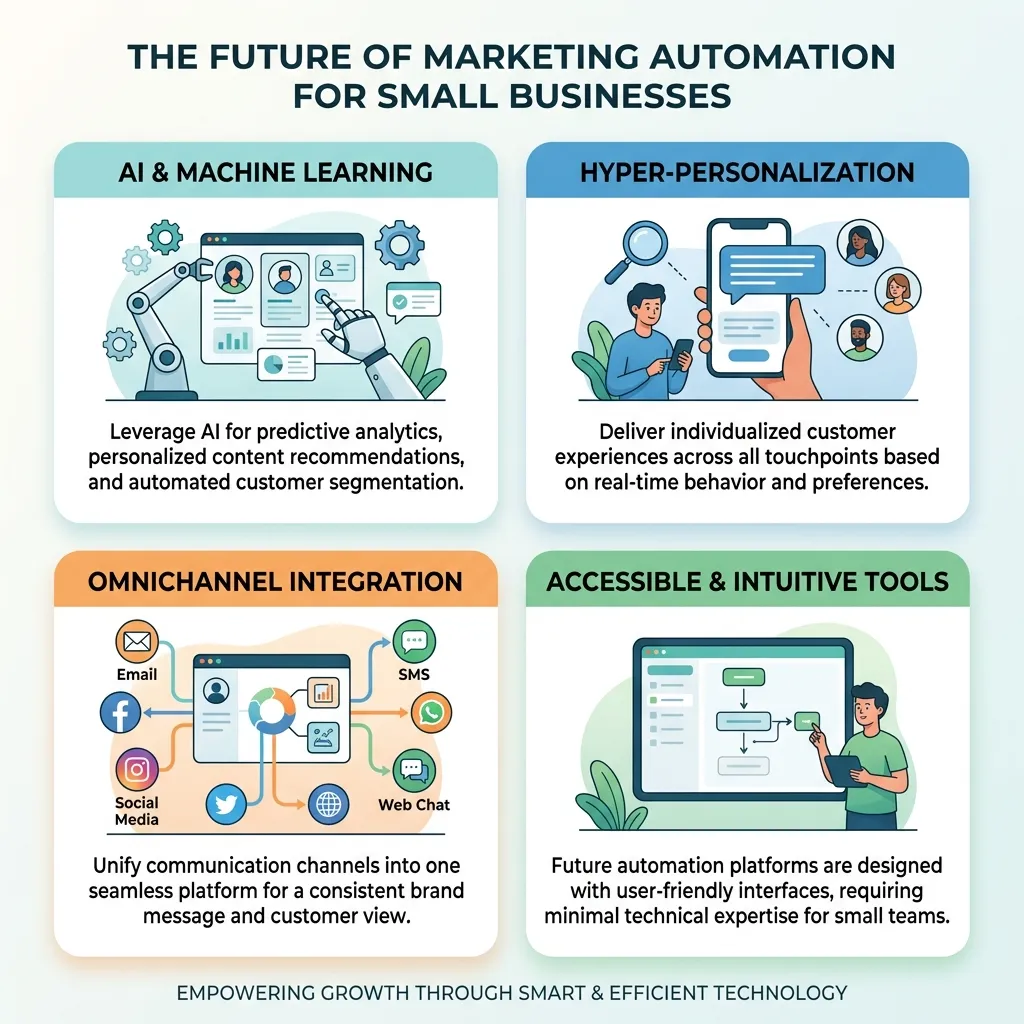
Marketing automation is becoming increasingly connected with artificial intelligence, predictive analytics, personalization, and real-time customer data.
Future automation systems are likely to help businesses identify customer intent, recommend content, personalize campaigns, and optimize communication more intelligently.
However, technology alone will not guarantee better marketing.
Small businesses still need clear positioning, useful content, strong customer service, and a good understanding of their audience. Automation works best when technology supports a well-defined marketing strategy.
Conclusion
Marketing automation tools for small business can transform how small teams manage customer communication, lead nurturing, email marketing, follow-ups, and campaign measurement. Instead of spending valuable hours on repetitive tasks, businesses can create structured workflows that deliver the right message at the right stage of the customer journey.
The best approach is to start with simple, high-value automations such as welcome emails, lead follow-ups, customer onboarding, and abandoned-cart campaigns. Once those workflows produce reliable results, businesses can gradually introduce segmentation, personalization, lead scoring, analytics, and more advanced automation.
The right tool is ultimately the one that fits your goals, budget, team capabilities, and existing technology. When implemented strategically, automation can help small businesses save time, improve customer experiences, and build a more scalable marketing operation.
Frequently Asked Questions
1. What are marketing automation tools for small business?
Marketing automation tools are software platforms that automate repetitive marketing activities such as email campaigns, lead nurturing, customer follow-ups, segmentation, scheduling, and campaign reporting.
2. Is marketing automation suitable for small businesses?
Yes. Marketing automation can be especially valuable for small businesses because it reduces repetitive work and allows small teams to manage larger numbers of prospects and customers more efficiently.
3. What is the best marketing automation tool for a small business?
There is no single best platform for every business. HubSpot, Mailchimp, ActiveCampaign, Brevo, Zoho Marketing Automation, and Klaviyo can all be considered depending on the business model, budget, channels, and automation requirements.
4. How much do marketing automation tools cost?
Pricing varies significantly by platform, features, contact volume, and usage. Many tools offer free or entry-level plans, while advanced automation and larger contact databases generally require paid subscriptions.
5. Can marketing automation generate leads?
Yes. Automation can support lead generation through landing pages, forms, lead magnets, email campaigns, segmentation, and automated nurturing workflows.
6. Can small businesses automate email marketing?
Yes. Email automation is one of the easiest places for a small business to begin. Businesses can automate welcome emails, follow-ups, promotional campaigns, onboarding sequences, and re-engagement campaigns.
7. Is marketing automation difficult to set up?
Basic automation is usually manageable for beginners, especially when platforms provide templates and visual workflow builders. More advanced systems may require technical knowledge and careful planning.
8. What tasks should a small business automate first?
Start with repetitive and predictable tasks such as welcome emails, lead follow-ups, appointment reminders, customer onboarding, abandoned-cart messages, and basic reporting.
9. Does marketing automation replace marketers?
No. Marketing automation supports marketers by handling repetitive processes. Strategy, creative development, customer relationships, complex sales, and decision-making still require human involvement.
10. How does marketing automation improve customer experience?
Automation can deliver timely and relevant communication based on customer actions. This can make interactions more consistent and reduce delays in follow-ups and support communication.
11. What metrics should small businesses track?
Important metrics include conversion rate, click-through rate, lead-to-customer rate, customer acquisition cost, customer lifetime value, revenue, engagement, and marketing automation ROI.
12. When should a small business start using marketing automation?
A business can start when repetitive marketing tasks begin taking significant time or when manual follow-up becomes difficult to manage. Starting with one simple workflow is often better than trying to automate the entire marketing process at once.





Comments (1)
Marketing Automation Best Practicessays:
September 12, 2026 at 12:14 pm[…] guide on marketing automation tools for small business covers platforms that make it easier to implement several of these best practices even with limited […]